Seedream 5.0 Pro layer separation: what it returns and how it is billed
How Seedream 5.0 Pro layer separation works through the API: input rules, size options, the layer data it returns, and per-layer billing you can check first.
Seedream 5.0 Pro layer separation takes one finished PNG or JPEG image and returns a base image plus up to 16 transparent PNG layers, each with its stacking order, position, name and description. It is billed per returned image, not per request: every layer costs the layer rate for its own pixel size. In the API the feature is called layer decomposition and is switched on with layer_decomposition: true. 1 2
ByteDance introduced the capability with the Seedream 5.0 Pro release on July 8, 2026, showing a poster split into more than ten layers, including text, the main subject and the background. Areas hidden behind the subject are filled in, so a layer can be moved without leaving a hole. 3 This guide covers what you send, what comes back, and how to estimate the cost before you run it. You can try it in the Seedream 5.0 Pro Playground by switching the mode to layer decomposition.
What you send
Layer separation uses the same image endpoint as ordinary generation, with stricter input rules. 1
| Field | Layer separation rule |
|---|---|
image | Exactly one image. PNG or JPEG, up to 30 MB, 512×512 to 6000×6000 total pixels (262,144 to 36,000,000), aspect ratio 1:16 to 16:1. A second image is rejected. |
prompt | Optional. Name the elements to separate, such as the title text and the parrot. Without a prompt, the model separates the main elements on its own. |
size | 1K, 1.5K, 2K or auto (the default). Exact pixel sizes are not accepted in this mode. |
output_format | jpeg (default) or png, applied to the base image only. Layers are always PNG. |
auto keeps the base image and each layer at their original size when that falls between 921,600 and 4,624,220 pixels, scales smaller ones up to 1K and larger ones down to 2K, and keeps each element's own aspect ratio. With a fixed preset, the base image matches the chosen size and each layer comes out at a resolution close to it. 1
On Wan API, layer separation cannot be combined with background: "transparent"; the layers already carry real transparency, and the request is rejected before anything is charged.
What comes back
The response lists the base image first (z_index: 0) and then each layer:
| Field | Meaning |
|---|---|
url | The PNG layer, or the base image in your chosen format. |
size | Pixel size of that output, for example 1273x265 for a title layer. |
z_index | Stacking order; 0 is the base image and higher numbers sit on top. |
bounding_box.absolute | Position in pixels within the base image. |
bounding_box.normalized | The same position on a 0–1000 scale, independent of resolution. |
name, description | What the model identified in that layer, such as the title text in the official example, with a short description. |
These fields are enough to rebuild the composition in a design tool: place each PNG at its bounding box, in z_index order. 1
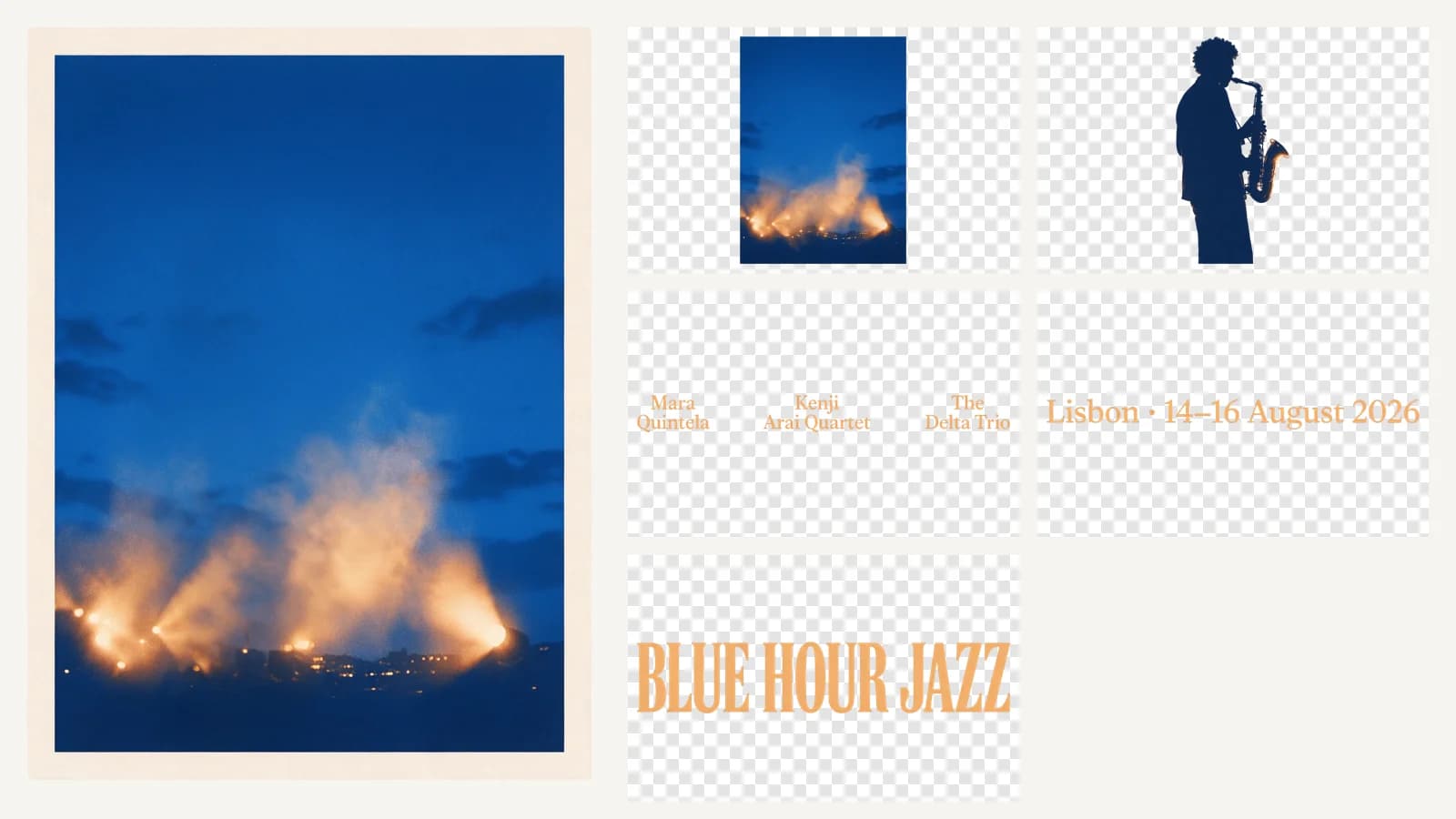
We ran it on a festival poster generated with Seedream 5.0 Pro, asking for the headline, the date line, the performer names, the saxophone player and the background. At 1.5K it returned the base image and five layers. The base image on the left no longer contains the text or the player; the background behind them was filled in.
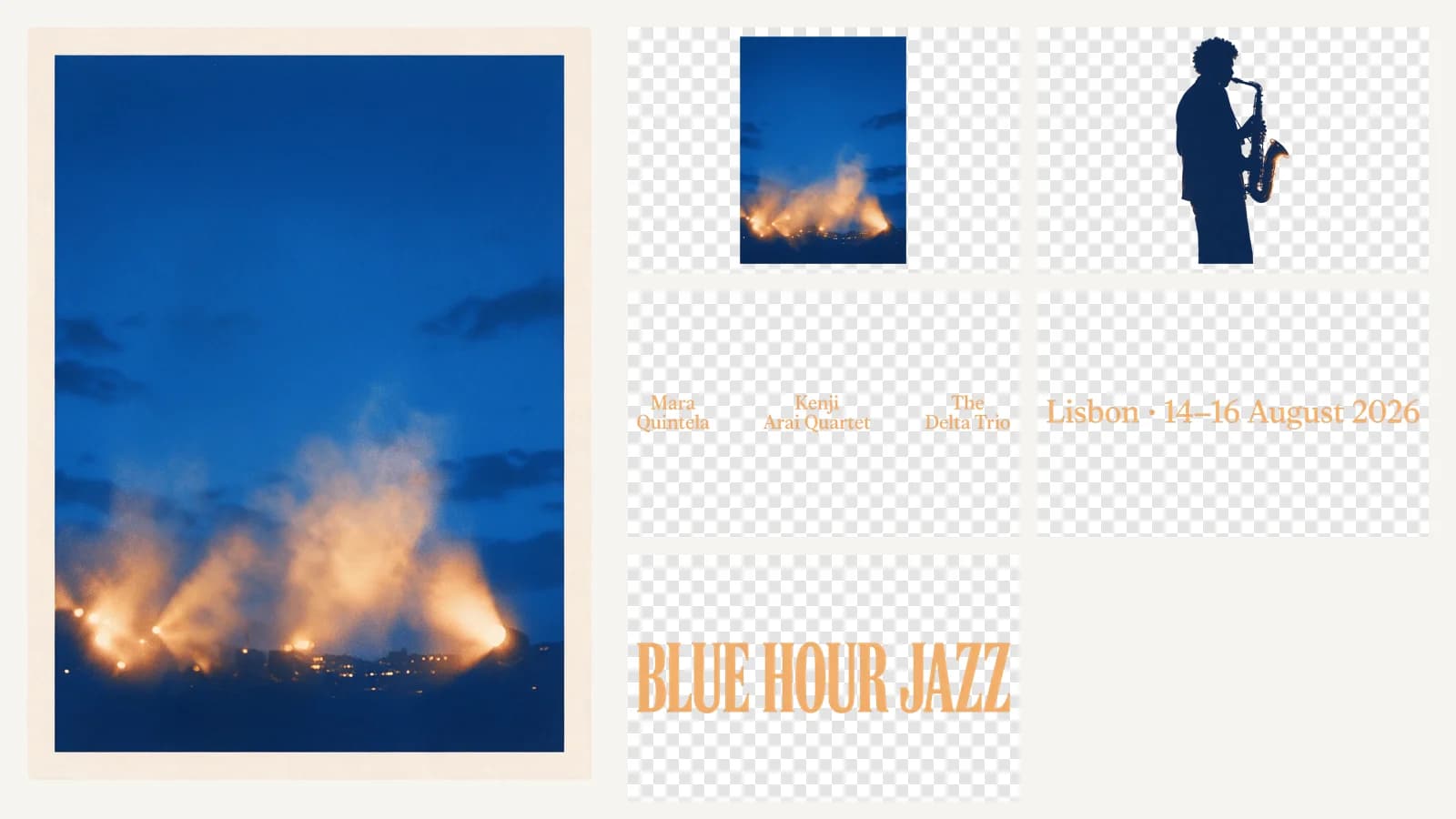
Each layer came back with an English name such as "BLUE HOUR JAZZ headline", matching the prompt. Small elements are delivered larger than they appear in the poster: the performer-name layer is 2011×202 pixels.
Two behaviors matter when you build on it. If any layer fails, the whole request fails; there is no partial result. And if your prompt asks for more layers than the 16-layer limit, some layer content may be dropped rather than the request failing. 1
How layer separation is billed
The official rate for Seedream 5.0 Pro layer decomposition is per output image: $0.0225 for an image up to 2.61 million pixels and $0.045 above that. 2 On Wan API, a result where every returned image is up to 2.61 million pixels costs 30% less, $0.01575 per image. A result that includes a larger image, as every 2K request does, is charged at the official rate for each image. The live figures are in the pricing table.
Because the model decides how many layers to return, the cost depends on the result:
| Result | Official rate | Wan API |
|---|---|---|
| 2K base image + 8 small layers (each up to 2.61 MP) | $0.045 + 8 × $0.0225 = $0.225 | $0.225 |
| 2K base image + 8 layers above 2.61 MP | 9 × $0.045 = $0.405 | $0.405 |
Largest possible result at auto or 2K: 17 images above 2.61 MP | 17 × $0.045 = $0.765 | $0.765 |
Largest possible result at 1K or 1.5K: 17 images up to 2.61 MP | 17 × $0.0225 = $0.3825 | $0.26775 |
A small element stays in the lower tier even in a 2K request: the 1273×265 title layer in the official example is about 0.34 million pixels. 1
In our run above, all six images were at or below 2.61 million pixels: the base image was 1344×1792 (about 2.41 million pixels) and the largest layer 1216×1662. That is 6 × $0.0225 = $0.135 at the official rate, and our gateway charged exactly the amount expected from the returned sizes. At the Wan API price the same result costs 6 × $0.01575 = $0.0945.
On Wan API, your balance must cover the largest possible result before the request starts, and you then pay only for the base image and layers actually returned. Choosing 1K or 1.5K lowers that ceiling from $0.765 to $0.26775 and usually keeps every image in the discounted lower tier.
Check how a plan counts layers
Read the billing terms before buying an image plan for this feature. In an August 2026 post, a BytePlus customer reported buying a Seedream 5.0 Pro image plan for layer separation and finding that layer requests were charged per layer at pay-as-you-go rates instead of using the plan's image quota; support acknowledged the distinction "may not have been clearly communicated". 4 Whatever service you use, confirm whether layers count against a package and what each layer costs.
Run it on Wan API
Send the request once to POST https://api.wanapi.app/v1/images/generations with your API key. The response returns when all layers are ready.
curl https://api.wanapi.app/v1/images/generations \
  -H "Authorization: Bearer $WAN_API_KEY" \
  -H "Content-Type: application/json" \
  -d '{
  "model": "bytedance/seedream-5.0-pro",
  "prompt": "Separate the title text, the parrot and the background",
  "image": "https://example.com/poster.png",
  "layer_decomposition": true,
  "size": "1.5K"
}'
Download the layers within 30 days. The Seedream 5.0 Pro API guide lists every field, the full response shape and the error codes.
When layer separation is the right tool
Use it when you already have a finished image and need editable parts: replacing a headline on a poster, moving a product shot, or handing a flat design to someone who works in layers. Use ordinary generation or reference editing when you want a new picture; use transparent background mode when you need one subject on a transparent background rather than a full layer stack.
Start in the Playground: upload one image, choose layer decomposition, and check the estimate before you generate.
Sources
- BytePlus ModelArk: image generation API,
layer_decomposition,size,output_formatand response fields for Seedream 5.0 Pro. Checked October 23, 2026.
- BytePlus ModelArk: model pricing, Seedream 5.0 Pro single-image and layer decomposition rates. Checked October 23, 2026.
- ByteDance Seed: Introducing Seedream 5.0 Pro, release post dated July 8, 2026, layer separation section. Checked October 23, 2026.
- Reddit r/generativeAI: "PSA: Why BytePlus Seedream 5.0 Pro's Layer Separation marketing felt misleading", customer account posted August 31, 2026. Checked October 23, 2026.
More Posts

Seedance 2.5 vs Seedance 2.0: which fits your scene?
Compare Seedance 2.5 and Seedance 2.0 duration, reference limits and sample settings. Plan a fair video test without assuming a quality or speed winner.


Seedance 2.0 Fast vs Mini: which should you test?
Compare Seedance 2.0 Fast and Mini limits, reference-video billing and sample scenes. Use a matched brief to test quality, turnaround and usable-shot cost.
Wan 3.0 API guide: models, inputs, and your first video
Compare Wan 3.0, Wan 3.0 Prime, Wan 3.0 Pro and Wan 3.0 Prime Pro API inputs and video output specifications, then prepare a focused first integration test.
Wan API updates
Service updates and model news
Sign up for model news, service updates and API integration information.